Mastering Kotlin 2.4+ SwiftPM (Part 4): Adding Shared Authentication UI screens and setting up navigation
Learn how to implement a shared UI for Authentication in a Kotlin Multiplatform (KMP) project and set up navigation using Navigation 3.
AG Mobile Labs•10 min read•
AndroidiOSKMPFirebaseAuthAndroid StudioFirebaseSwift Package ManagerKotlin
In the previous article, we learned how to implement Firebase Authentication in our Kotlin Multiplatform project using the interface pattern to keep
commonMain code clean and testable.
In this article, we will continue building our AuroraAi KMP app and create the authentication UI screens and set up navigation between them.Here's a preview of the Sign In and Sign Up screens we'll be building, which let users authenticate with email and password.
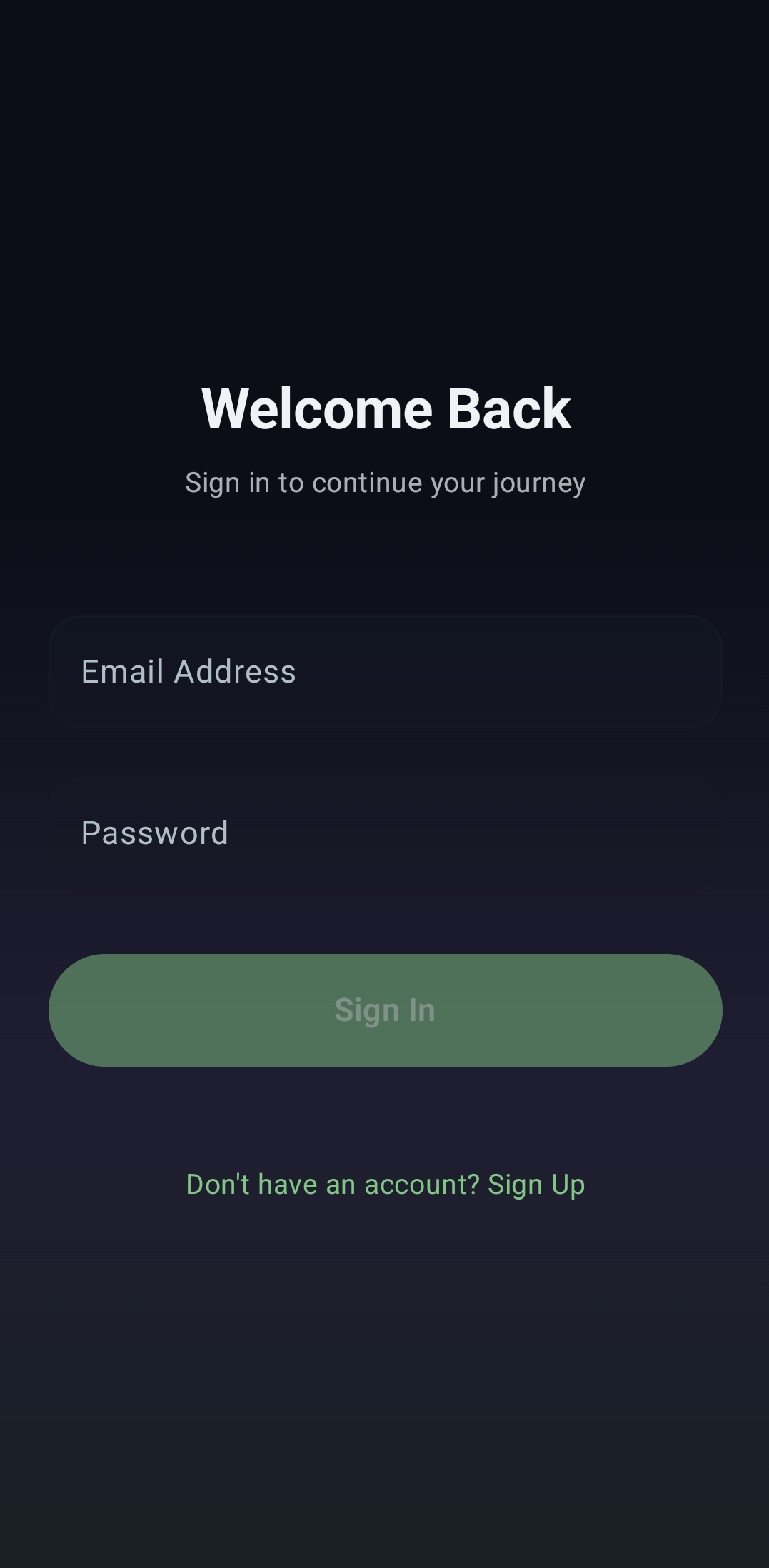
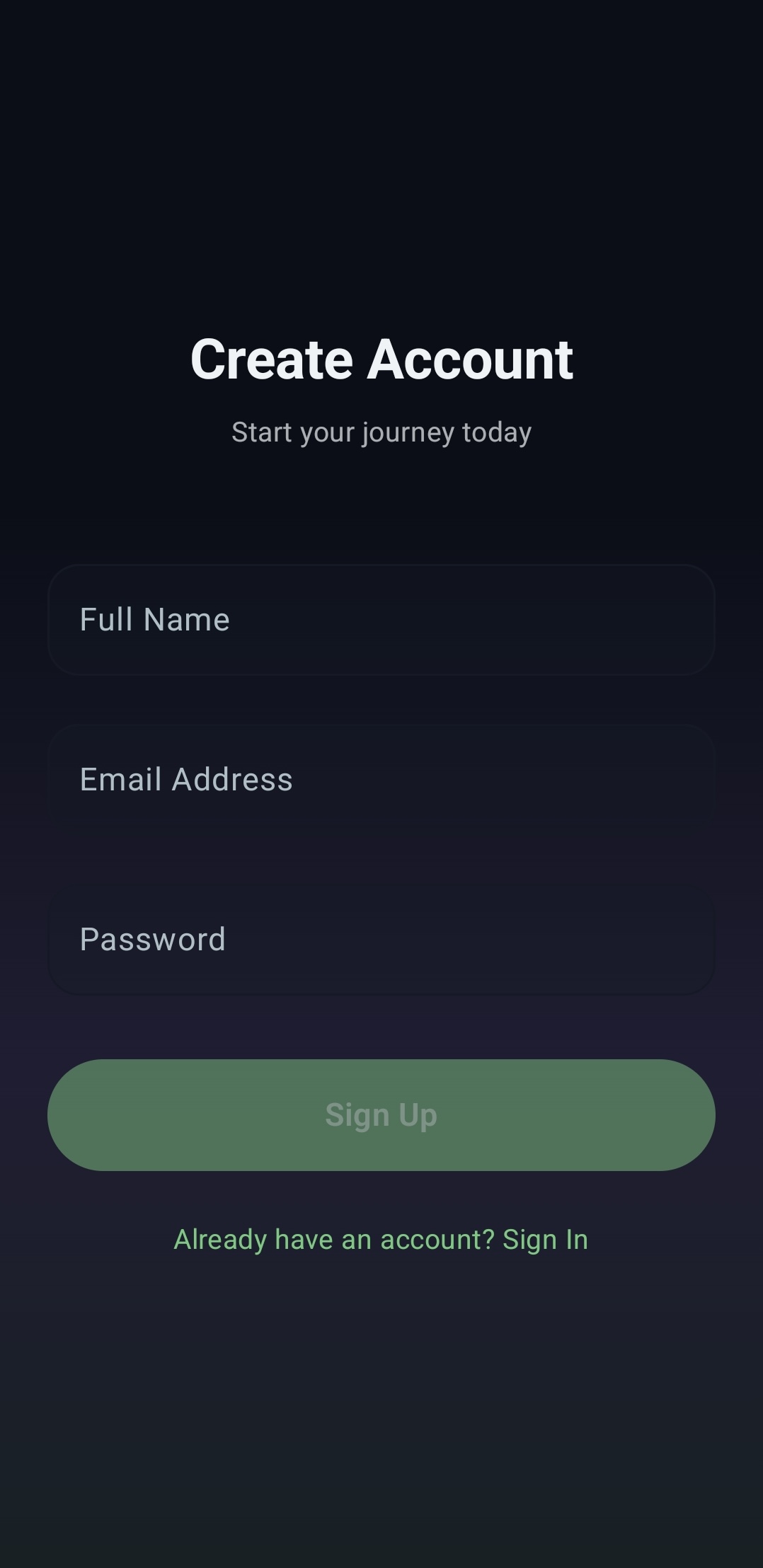
Since our KMP project is already configured to use shared UI (as we set up in Part 2), we'll build the entire UI with Compose Multiplatform in the
commonMain source set.Setting Up the App's Theme
First, let's define the app's color scheme. We'll use custom colors while keeping the default typography, and since the app is dark-only, there's no need for a light theme.
Create two files under
presentation/ui/theme: Color.kt and Theme.kt.Color.kt
// shared/src/commonMain/kotlin/com/ai/auroraai/presentation/ui/theme/Color.kt

import androidx.compose.ui.graphics.Color

val AuroraNavy = Color(0xFF0B0E17)
val AuroraMidnight = Color(0xFF151925)
val AuroraGreen = Color(0xFF81C784) // Softer Green
val AuroraPurple = Color(0xFF9575CD) // Softer Purple
val AuroraBlue = Color(0xFF64B5F6)   // Softer Blue
val TextPrimary = Color(0xFFEFF3F5)
val TextSecondary = Color(0xFFB0BEC5)
Theme.kt
// shared/src/commonMain/kotlin/com/ai/auroraai/presentation/ui/theme/Theme.kt

import androidx.compose.material3.MaterialTheme
import androidx.compose.material3.darkColorScheme
import androidx.compose.runtime.Composable
import androidx.compose.ui.graphics.Color

private val DarkColorScheme = darkColorScheme(
    primary = AuroraGreen,
    secondary = AuroraPurple,
    tertiary = AuroraBlue,
    background = AuroraNavy,
    surface = AuroraMidnight,
    onPrimary = Color.Black, // Dark text on light pastel colors
    onSecondary = Color.Black,
    onBackground = TextPrimary,
    onSurface = TextPrimary
)

@Composable
fun AuroraAITheme(
    content: @Composable () -> Unit
) {
    MaterialTheme(
        colorScheme = DarkColorScheme,
        typography = Typography(),
        content = content
    )
}
Building the UI elements
Both screens share a few common UI elements — the gradient background, styled buttons, and text fields — so let's extract those into a
common package under presentation.AuroraComponents.kt
// shared/src/commonMain/kotlin/com/ai/auroraai/presentation/common/AuroraComponents.kt

package com.ai.auroraai.presentation.common

import androidx.compose.foundation.background
import androidx.compose.foundation.layout.Box
import androidx.compose.foundation.layout.BoxScope
import androidx.compose.foundation.layout.Spacer
import androidx.compose.foundation.layout.fillMaxSize
import androidx.compose.foundation.layout.fillMaxWidth
import androidx.compose.foundation.layout.height
import androidx.compose.foundation.layout.width
import androidx.compose.foundation.shape.RoundedCornerShape
import androidx.compose.foundation.text.KeyboardOptions
import androidx.compose.material3.Button
import androidx.compose.material3.ButtonDefaults
import androidx.compose.material3.MaterialTheme
import androidx.compose.material3.OutlinedTextField
import androidx.compose.material3.OutlinedTextFieldDefaults
import androidx.compose.material3.Text
import androidx.compose.runtime.Composable
import androidx.compose.ui.Modifier
import androidx.compose.ui.graphics.Brush
import androidx.compose.ui.graphics.Color
import androidx.compose.ui.text.font.FontWeight
import androidx.compose.ui.text.input.VisualTransformation
import androidx.compose.ui.unit.dp
import com.ai.auroraai.presentation.ui.theme.AuroraGreen
import com.ai.auroraai.presentation.ui.theme.AuroraNavy
import com.ai.auroraai.presentation.ui.theme.AuroraPurple
import com.ai.auroraai.presentation.ui.theme.TextSecondary

@Composable
fun AuroraBackground(modifier: Modifier = Modifier, content: @Composable BoxScope.() -> Unit) {
    Box(
        modifier =
            modifier.fillMaxSize()
                .background(AuroraNavy)
                .background(
                    brush =
                        Brush.verticalGradient(
                            colors =
                                listOf(
                                    AuroraNavy,
                                    AuroraNavy,
                                    AuroraPurple.copy(
                                        alpha = 0.15f
                                    ),
                                    AuroraGreen.copy(
                                        alpha = 0.1f
                                    )
                                )
                        )
                ),
        content = content
    )
}

@Composable
fun AuroraButton(
    text: String,
    onClick: () -> Unit,
    modifier: Modifier = Modifier,
    enabled: Boolean = true,
    containerColor: Color = MaterialTheme.colorScheme.primary,
    contentColor: Color = MaterialTheme.colorScheme.onPrimary,
    icon: @Composable (() -> Unit)? = null
) {
    Button(
        onClick = onClick,
        modifier = modifier.fillMaxWidth().height(56.dp),
        enabled = enabled,
        shape = RoundedCornerShape(28.dp),
        colors =
            ButtonDefaults.buttonColors(
                containerColor = containerColor,
                contentColor = contentColor,
                disabledContainerColor = containerColor.copy(alpha = 0.5f)
            )
    ) {
        if (icon != null) {
            icon()
            Spacer(modifier = Modifier.width(8.dp))
        }
        Text(
            text = text,
            style = MaterialTheme.typography.titleMedium,
            fontWeight = FontWeight.SemiBold
        )
    }
}

@Composable
fun AuroraTextField(
    value: String,
    onValueChange: (String) -> Unit,
    label: String,
    modifier: Modifier = Modifier,
    isError: Boolean = false,
    visualTransformation: VisualTransformation =
        VisualTransformation.None,
    keyboardOptions: KeyboardOptions =
        KeyboardOptions.Default
) {
    OutlinedTextField(
        value = value,
        onValueChange = onValueChange,
        label = { Text(label) },
        modifier = modifier.fillMaxWidth(),
        isError = isError,
        visualTransformation = visualTransformation,
        keyboardOptions = keyboardOptions,
        shape = RoundedCornerShape(16.dp),
        colors =
            OutlinedTextFieldDefaults.colors(
                focusedBorderColor = MaterialTheme.colorScheme.primary,
                unfocusedBorderColor = MaterialTheme.colorScheme.surface,
                focusedLabelColor = MaterialTheme.colorScheme.primary,
                unfocusedLabelColor = TextSecondary,
                focusedContainerColor =
                    MaterialTheme.colorScheme.surface.copy(alpha = 0.5f),
                unfocusedContainerColor =
                    MaterialTheme.colorScheme.surface.copy(alpha = 0.3f),
                errorBorderColor = MaterialTheme.colorScheme.error
            ),
        singleLine = true
    )
}
Now let's create the screens themselves. Add a new
auth package under presentation with three files: SignInScreen.kt, SignUpScreen.kt, and AuthViewModel.kt.SignInScreen.kt
// shared/src/commonMain/kotlin/com/ai/auroraai/presentation/auth/SignInScreen.kt

package com.ai.auroraai.presentation.auth

import androidx.compose.foundation.clickable
import androidx.compose.foundation.layout.Arrangement
import androidx.compose.foundation.layout.Column
import androidx.compose.foundation.layout.Spacer
import androidx.compose.foundation.layout.fillMaxSize
import androidx.compose.foundation.layout.height
import androidx.compose.foundation.layout.padding
import androidx.compose.material3.MaterialTheme
import androidx.compose.material3.Text
import androidx.compose.runtime.Composable
import androidx.compose.runtime.LaunchedEffect
import androidx.compose.runtime.getValue
import androidx.compose.runtime.mutableStateOf
import androidx.compose.runtime.remember
import androidx.compose.runtime.setValue
import androidx.compose.ui.Alignment
import androidx.compose.ui.Modifier
import androidx.compose.ui.text.font.FontWeight
import androidx.compose.ui.text.input.PasswordVisualTransformation
import androidx.compose.ui.unit.dp
import androidx.lifecycle.compose.collectAsStateWithLifecycle
import com.ai.auroraai.presentation.common.AuroraBackground
import com.ai.auroraai.presentation.common.AuroraButton
import com.ai.auroraai.presentation.common.AuroraTextField

@Composable
fun SignInScreen(
    onSignInSuccess: () -> Unit,
    onSignUpClick: () -> Unit,
    viewModel: AuthViewModel
) {
    var email by remember { mutableStateOf("") }
    var password by remember { mutableStateOf("") }

    val uiState by viewModel.uiState.collectAsStateWithLifecycle()

    LaunchedEffect(uiState.isSuccess) {
        if (uiState.isSuccess) {
            onSignInSuccess()
            viewModel.resetState()
        }
    }

    AuroraBackground {
        Column(
            modifier = Modifier
                .fillMaxSize()
                .padding(24.dp),
            horizontalAlignment = Alignment.CenterHorizontally,
            verticalArrangement = Arrangement.Center
        ) {
            Text(
                text = "Welcome Back",
                style = MaterialTheme.typography.headlineMedium,
                color = MaterialTheme.colorScheme.onBackground,
                fontWeight = FontWeight.Bold
            )

            Spacer(modifier = Modifier.height(8.dp))

            Text(
                text = "Sign in to continue your journey",
                style = MaterialTheme.typography.bodyMedium,
                color = MaterialTheme.colorScheme.onSurface.copy(alpha = 0.7f)
            )

            Spacer(modifier = Modifier.height(48.dp))
            AuroraTextField(
                value = email,
                onValueChange = { email = it },
                label = "Email Address"
            )

            Spacer(modifier = Modifier.height(16.dp))

            AuroraTextField(
                value = password,
                onValueChange = { password = it },
                label = "Password",
                visualTransformation = PasswordVisualTransformation()
            )

            if (uiState.error != null) {
                Spacer(modifier = Modifier.height(16.dp))
                Text(
                    text = uiState.error!!,
                    color = MaterialTheme.colorScheme.error,
                    style = MaterialTheme.typography.bodySmall
                )
            }

            Spacer(modifier = Modifier.height(32.dp))

            AuroraButton(
                text = if (uiState.isLoading) "Signing In..." else "Sign In",
                onClick = { viewModel.onSignIn(email, password) },
                enabled =
                    email.isNotBlank() &&
                            password.isNotBlank() &&
                            !uiState.isLoading
            )

            Spacer(modifier = Modifier.height(24.dp))

            Text(
                text = "Don't have an account? Sign Up",
                style = MaterialTheme.typography.bodyMedium,
                color = MaterialTheme.colorScheme.primary,
                modifier = Modifier.clickable { onSignUpClick() }
            )
        }
    }
}
SignUpScreen.kt
// shared/src/commonMain/kotlin/com/ai/auroraai/presentation/auth/SignUpScreen.kt

package com.ai.auroraai.presentation.auth

import androidx.compose.foundation.clickable
import androidx.compose.foundation.layout.Arrangement
import androidx.compose.foundation.layout.Column
import androidx.compose.foundation.layout.Spacer
import androidx.compose.foundation.layout.fillMaxSize
import androidx.compose.foundation.layout.height
import androidx.compose.foundation.layout.padding
import androidx.compose.material3.MaterialTheme
import androidx.compose.material3.Text
import androidx.compose.runtime.Composable
import androidx.compose.runtime.LaunchedEffect
import androidx.compose.runtime.getValue
import androidx.compose.runtime.mutableStateOf
import androidx.compose.runtime.remember
import androidx.compose.runtime.setValue
import androidx.compose.ui.Alignment
import androidx.compose.ui.Modifier
import androidx.compose.ui.text.font.FontWeight
import androidx.compose.ui.text.input.PasswordVisualTransformation
import androidx.compose.ui.unit.dp
import androidx.lifecycle.compose.collectAsStateWithLifecycle
import com.ai.auroraai.presentation.common.AuroraBackground
import com.ai.auroraai.presentation.common.AuroraButton
import com.ai.auroraai.presentation.common.AuroraTextField

@Composable
fun SignUpScreen(
    onSignUpSuccess: () -> Unit,
    onSignInClick: () -> Unit,
    viewModel: AuthViewModel
) {
    var name by remember { mutableStateOf("") }
    var email by remember { mutableStateOf("") }
    var password by remember { mutableStateOf("") }

    val uiState by viewModel.uiState.collectAsStateWithLifecycle()

    LaunchedEffect(uiState.isSuccess) {
        if (uiState.isSuccess) {
            onSignUpSuccess()
            viewModel.resetState()
        }
    }

    AuroraBackground {
        Column(
            modifier = Modifier
                .fillMaxSize()
                .padding(24.dp),
            verticalArrangement = Arrangement.Center,
            horizontalAlignment = Alignment.CenterHorizontally
        ) {
            Text(
                text = "Create Account",
                style = MaterialTheme.typography.headlineMedium,
                color = MaterialTheme.colorScheme.onBackground,
                fontWeight = FontWeight.Bold
            )

            Spacer(modifier = Modifier.height(8.dp))

            Text(
                text = "Start your journey today",
                style = MaterialTheme.typography.bodyMedium,
                color = MaterialTheme.colorScheme.onSurface.copy(alpha = 0.7f)
            )

            Spacer(modifier = Modifier.height(48.dp))

            AuroraTextField(
                value = name,
                onValueChange = { name = it },
                label = "Full Name"
            )

            Spacer(modifier = Modifier.height(16.dp))

            AuroraTextField(
                value = email,
                onValueChange = { email = it },
                label = "Email Address"
            )

            Spacer(modifier = Modifier.height(16.dp))

            AuroraTextField(
                value = password,
                onValueChange = { password = it },
                label = "Password",
                visualTransformation = PasswordVisualTransformation()
            )

            if (uiState.error != null) {
                Spacer(modifier = Modifier.height(16.dp))
                Text(
                    text = uiState.error!!,
                    color = MaterialTheme.colorScheme.error,
                    style = MaterialTheme.typography.bodySmall
                )
            }

            Spacer(modifier = Modifier.height(32.dp))

            AuroraButton(
                text = if (uiState.isLoading) "Creating Account..." else "Sign Up",
                onClick = { viewModel.onSignUp(email, password) },
                enabled =
                    name.isNotBlank() &&
                            email.isNotBlank() &&
                            password.isNotBlank() &&
                            !uiState.isLoading
            )

            Spacer(modifier = Modifier.height(24.dp))

            Text(
                text = "Already have an account? Sign In",
                style = MaterialTheme.typography.bodyMedium,
                color = MaterialTheme.colorScheme.primary,
                modifier = Modifier.clickable { onSignInClick() }
            )
        }
    }
}
AuthViewModel.kt
// shared/src/commonMain/kotlin/com/ai/auroraai/presentation/auth/AuthViewModel.kt

package com.ai.auroraai.presentation.auth

import androidx.lifecycle.ViewModel
import androidx.lifecycle.viewModelScope
import com.ai.auroraai.domain.AuthManager
import kotlinx.coroutines.flow.MutableStateFlow
import kotlinx.coroutines.flow.StateFlow
import kotlinx.coroutines.flow.asStateFlow
import kotlinx.coroutines.flow.update
import kotlinx.coroutines.launch

data class AuthUiState(
    val isLoading: Boolean = false,
    val error: String? = null,
    val isSuccess: Boolean = false
)

class AuthViewModel(private val authManager: AuthManager) : ViewModel() {

    private val _uiState = MutableStateFlow(AuthUiState())
    val uiState: StateFlow<AuthUiState> = _uiState.asStateFlow()

    fun onSignIn(email: String, password: String) {
        viewModelScope.launch {
            _uiState.update { it.copy(isLoading = true, error = null) }
            authManager.signIn(email, password) { success, errorMessage ->
                if (success) {
                    _uiState.update { it.copy(isLoading = false, isSuccess = true) }
                } else {
                    _uiState.update {
                        it.copy(
                            isLoading = false,
                            error = "Error: ${errorMessage ?: "Unknown error"}"
                        )
                    }
                }
            }
        }
    }

    fun onSignUp(email: String, password: String) {
        viewModelScope.launch {
            _uiState.update { it.copy(isLoading = true, error = null) }
            authManager.signUp(email, password) { success, errorMessage ->
                if (success) {
                    _uiState.update { it.copy(isLoading = false, isSuccess = true) }
                } else {
                    _uiState.update {
                        it.copy(
                            isLoading = false,
                            error = "Error: ${errorMessage ?: "Unknown error"}"
                        )
                    }
                }
            }
        }
    }
Now let's extend the
AuthManager from Part 3 by adding the signUp function. We'll also update the platform-specific implementations in AndroidAuthManager.kt and IosAuthManager.kt.// shared/src/commonMain/kotlin/com/ai/auroraai/domain/AuthManager.kt
interface AuthManager {
fun signIn(email: String, password: String, onResult: (Boolean, String?) -> Unit)
fun signUp(email: String, password: String, onResult: (Boolean, String?) -> Unit)
}AndroidAuthManager.kt
// shared/src/androidMain/kotlin/com/ai/auroraai/data/AndroidAuthManager.kt

package com.ai.auroraai.data

import com.ai.auroraai.domain.AuthManager
import com.google.firebase.auth.FirebaseAuth

class AndroidAuthManager : AuthManager {
    private val auth: FirebaseAuth
        get() = FirebaseAuth.getInstance()

    override fun signIn(
        email: String,
        password: String,
        onResult: (Boolean, String?) -> Unit
    ) {
        auth.signInWithEmailAndPassword(email, password)
            .addOnCompleteListener { task ->
                if (task.isSuccessful) {
                    onResult(true, null)
                } else {
                    onResult(false, task.exception?.localizedMessage ?: "Authentication failed")
                }
            }
    }

    override fun signUp(email: String, password: String, onResult: (Boolean, String?) -> Unit) {
        auth.createUserWithEmailAndPassword(email, password)
            .addOnCompleteListener { task ->
                if (task.isSuccessful) {
                    onResult(true, null)
                } else {
                    onResult(false, task.exception?.localizedMessage ?: "Registration failed")
                }
            }
    }
}
IosAuthManager.kt
// shared/src/iosMain/kotlin/com/ai/auroraai/data/IOSAuthManager.kt

package com.ai.auroraai.data

import com.ai.auroraai.domain.AuthManager
import kotlinx.cinterop.ExperimentalForeignApi
import swiftPMImport.AuroraAi.shared.FIRAuth

@OptIn(ExperimentalForeignApi::class)
class IosAuthManager : AuthManager {
    override fun signIn(
        email: String,
        password: String,
        onResult: (Boolean, String?) -> Unit
    ) {
        FIRAuth.auth().signInWithEmail(email, password = password) { result, error ->
            if (error != null) {
                onResult(false, error.localizedDescription)
            } else {
                onResult(true, null)
            }
        }
    }

    override fun signUp(email: String, password: String, onResult: (Boolean, String?) -> Unit) {
        FIRAuth.auth().createUserWithEmail(email, password = password) { result, error ->
            if (error != null) {
                onResult(false, error.localizedDescription)
            } else {
                onResult(true, null)
            }
        }
    }
}
The
LoginViewModel from Part 3 can now be removed in favor of our production-ready AuthViewModel.To wire up SignUpScreen and SignInScreen, we need to set up navigation. For this purpose, we'll use the Jetpack Compose Navigation 3 library, which is supported in KMP projects.
Implement Navigation
Configure Jetpack Compose Navigation 3
Start by adding the required dependencies to your
libs.versions.toml file.# gradle/libs.versions.toml
[libraries]
...
kotlinx-serialization-json = { module = "org.jetbrains.kotlinx:kotlinx-serialization-json", version = "1.11.0" }
jetbrains-navigation3-ui = { module = "org.jetbrains.androidx.navigation3:navigation3-ui", version = "1.1.1" }
[plugins]
...
kotlinX-serialization = { id = "org.jetbrains.kotlin.plugin.serialization", version = "2.4.0" }Sync the project, then apply the dependencies in
shared/build.gradle.kts.// shared/build.gradle.kts
plugins {
...
alias(libs.plugins.kotlinX.serialization)
}
...
kotlin {
sourceSets {
...
commonMain.dependencies {
...
implementation(libs.jetbrains.navigation3.ui)
implementation(libs.kotlinx.serialization.json)
}
}Sync the project. Once the sync completes, the navigation dependencies should be configured, and we can move on to implementation.
Implement Jetpack Compose Navigation 3
We'll start by defining the destination keys for our navigation graph. These are simple references to each screen — SignIn and SignUp, which we've already built, plus a Home placeholder that we'll navigate to after a successful login.
Create a new
navigation package under presentation and add a file called Screens.kt.Screens.kt
// shared/src/commonMain/kotlin/com/ai/auroraai/presentation/navigation/Screens.kt

package com.ai.auroraai.presentation.navigation

import androidx.navigation3.runtime.NavKey
import kotlinx.serialization.Serializable

@Serializable
sealed interface Screen : NavKey {
    @Serializable data object Home : Screen
    @Serializable data object SignIn : Screen
    @Serializable data object SignUp : Screen
}
Next, create
AppNavigation.kt in the same package — this will be our navigation root.// shared/src/commonMain/kotlin/com/ai/auroraai/presentation/navigation/AppNavigation.kt
package com.ai.auroraai.presentation.navigation
import androidx.compose.foundation.layout.Box
import androidx.compose.foundation.layout.fillMaxSize
import androidx.compose.foundation.layout.padding
import androidx.compose.material3.Scaffold
import androidx.compose.material3.Text
import androidx.compose.runtime.Composable
import androidx.compose.ui.Modifier
import androidx.compose.ui.graphics.Color
import androidx.navigation3.runtime.NavKey
import androidx.navigation3.runtime.entryProvider
import androidx.navigation3.runtime.rememberNavBackStack
import androidx.navigation3.ui.NavDisplay
import androidx.savedstate.serialization.SavedStateConfiguration
import com.ai.auroraai.presentation.auth.AuthViewModel
import com.ai.auroraai.presentation.auth.SignInScreen
import com.ai.auroraai.presentation.auth.SignUpScreen
import kotlinx.serialization.modules.SerializersModule
import kotlinx.serialization.modules.polymorphic
@Composable
fun AppNavigation(
authViewModel: AuthViewModel
) {
val backStack = rememberNavBackStack(
configuration =
SavedStateConfiguration {
serializersModule = SerializersModule {
polymorphic(NavKey::class) {
subclass(Screen.Home::class, Screen.Home.serializer())
subclass(Screen.SignIn::class, Screen.SignIn.serializer())
subclass(Screen.SignUp::class, Screen.SignUp.serializer())
}
}
},
Screen.SignIn
)
NavDisplay(
modifier = Modifier.fillMaxSize(),
backStack = backStack,
entryProvider = entryProvider {
entry<Screen.SignIn> {
SignInScreen(
onSignInSuccess = {
backStack.clear()
backStack.add(Screen.Home)
},
onSignUpClick = {
backStack.add(Screen.SignUp)
},
viewModel = authViewModel
)
}
entry<Screen.SignUp> {
SignUpScreen(
onSignUpSuccess = {
backStack.clear()
backStack.add(Screen.Home)
},
onSignInClick = {
backStack.add(Screen.SignIn)
},
viewModel = authViewModel
)
}
entry<Screen.Home> { key ->
Scaffold(
containerColor = Color.Transparent
) { innerPadding ->
Box(modifier = Modifier.fillMaxSize().padding(innerPadding)) {
Text(text = "Home Screen")
}
}
}
}
)
}
With the navigation graph in place, all that's left is to wire it into
App.kt by initializing the AuthViewModel and calling AppNavigation.// shared/src/commonMain/kotlin/com/ai/auroraai/presentation/App.kt
package com.ai.auroraai.presentation
import androidx.compose.runtime.Composable
import androidx.compose.runtime.remember
import androidx.compose.ui.tooling.preview.Preview
import com.ai.auroraai.data.createAuthManager
import com.ai.auroraai.presentation.auth.AuthViewModel
import com.ai.auroraai.presentation.navigation.AppNavigation
import com.ai.auroraai.presentation.ui.theme.AuroraAITheme
@Composable
@Preview
fun App() {
val authViewModel = remember {
AuthViewModel(authManager = createAuthManager())
}
AuroraAITheme {
AppNavigation(authViewModel)
}
}That's it — your authentication flow is fully wired up! Launch the app and try signing in and signing up with an email and password to see everything in action.
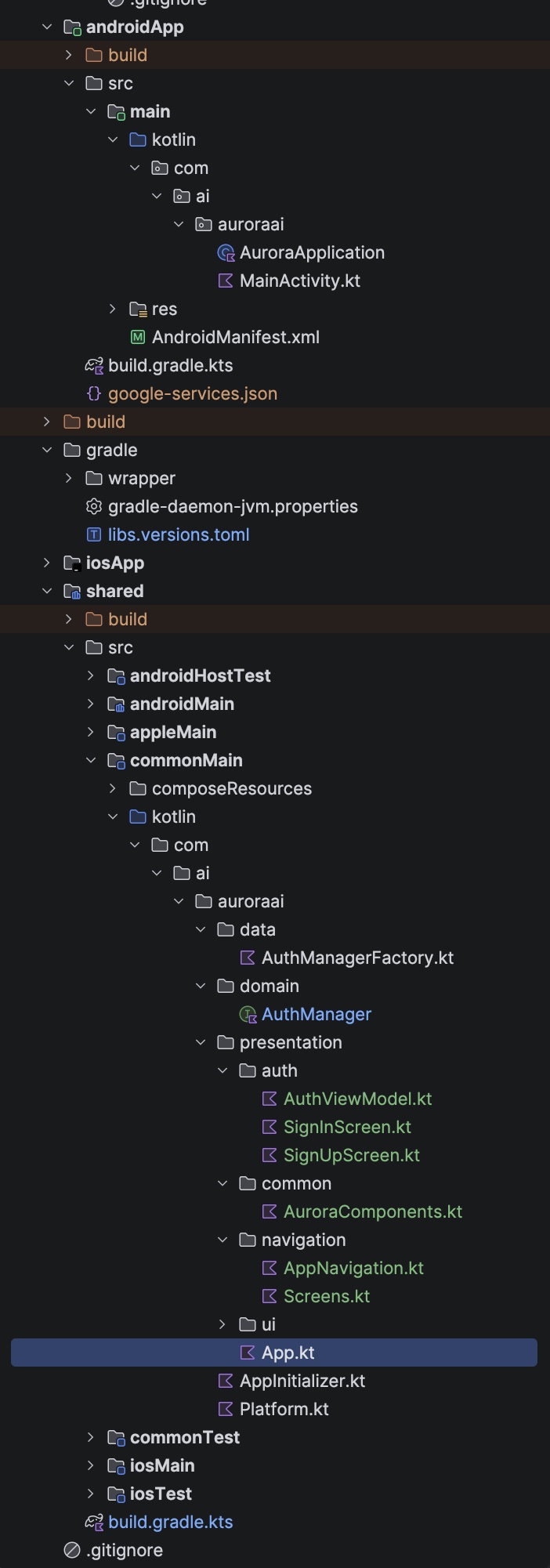
The shared module architecture should now look like this:
💬Comments
Loading comments...
Enjoyed this article?
Subscribe to my newsletter to get the latest articles on Android architecture, KMP, and mobile engineering straight to your inbox.