Pragmatic AI Integration in Android: On-Device vs Cloud Models
A senior engineer's guide to integrating AI in Android apps. Learn how to choose between Gemini Nano and Cloud APIs, and how to architect your app for unreliable AI responses.
AG Mobile Labs•7 min read•
AndroidAIGeminiMachine LearningClean ArchitectureMobile Development
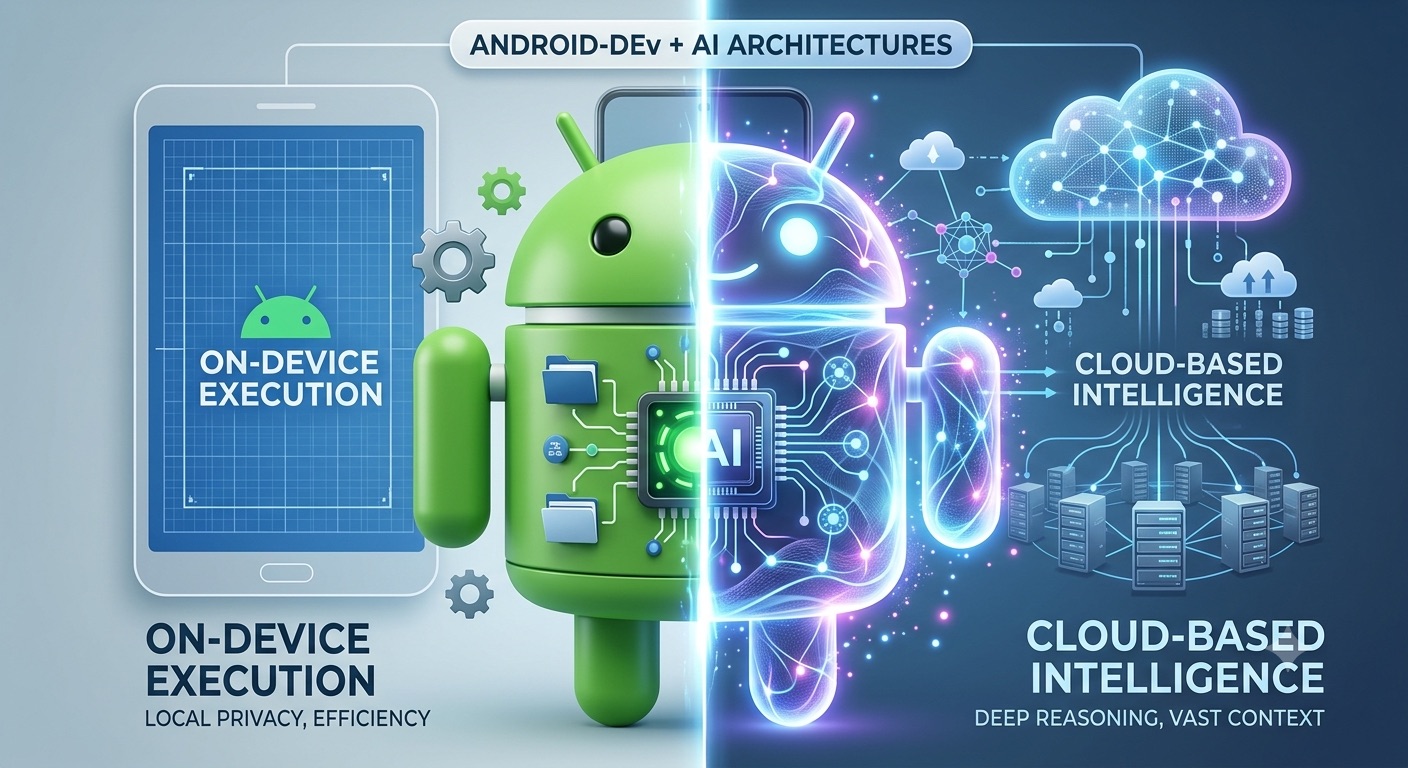
Pragmatic AI Integration in Android: On-Device vs Cloud Models
⚡TL;DR
Integrating AI in Android involves balancing On-Device inference (Gemini Nano/ML Kit) for low latency, offline support, and privacy against Cloud-Based inference (Gemini Pro/Vertex AI) for deep reasoning and vast context windows. To ensure production scalability, abstract AI SDKs behind domain interfaces using Clean Architecture, leverage Kotlin Flow to stream responses, and build cloud-first, local-fallback loops for network resilience.
AI is no longer a buzzword; it's an expected feature in modern mobile applications. As Android engineers, our job isn't just to add a chat interface to our apps—it's to integrate AI features in a way that respects the user's battery, data privacy, and the unreliability of mobile networks.
Based on Google's latest Android AI architecture guidelines, integrating AI generally falls into two distinct categories: On-Device (like Gemini Nano and ML Kit) and Cloud-Based (like Gemini Pro or Vertex AI).
In this article, we'll break down how to choose the right approach for your feature and, more importantly, how to architect your Android app so that AI integration doesn't turn your codebase into a messy, tightly-coupled nightmare.
What Are the Core Differences Between On-Device and Cloud AI?
When designing a feature that requires machine learning or generative AI, the first architectural decision you must make is where the inference happens.
1. On-Device AI (Gemini Nano & ML Kit)
Google is pushing heavily for on-device inference via AICore (which powers Gemini Nano) and traditional ML Kit models.
The Pros:
- Zero Latency: Inference happens instantly on the neural processing unit (NPU).
- Privacy-First: User data never leaves the device, which is critical for healthcare, finance, or secure messaging apps.
- Offline Support: The feature works flawlessly in airplane mode or subways.
- Cost: No cloud compute costs for every API call.
The Cons:
- Device Support: GenAI features require specific hardware capabilities (such as sufficient RAM and NPU performance) to run models locally, meaning they are primarily supported on flagship and high-performance devices. You must programmatically check for support. See ML Kit GenAI device support for details.
- Capability Limits: Gemini Nano is powerful, but it cannot match the reasoning or context window of a massive cloud model like Gemini 1.5 Pro.
Best used for: Smart replies, text summarization of local documents, local image classification (ML Kit), and privacy-sensitive data extraction.
2. Cloud-Based AI (Gemini Flash & Pro)
For heavy lifting, you'll reach for cloud APIs, often integrated via the Vertex AI SDK or Firebase AI Logic.
The Pros:
- Massive Capability: Access to multimodal inputs, massive context windows, and superior reasoning.
- Easy Updates: You can swap models or tweak system prompts on the backend without releasing a new APK.
The Cons:
- Network Reliability: Mobile connections are flaky. A 5-second inference time becomes a 15-second timeout on a 3G network.
- Cost: API calls scale with your user base.
Best used for: Complex reasoning, generating large amounts of content, multimodal analysis (analyzing a video), and features requiring up-to-date web knowledge.
How to Architect Android Apps for Scalable AI Integration
Regardless of whether you choose on-device or cloud AI, the way you integrate it into your codebase matters. AI endpoints are notorious for changing interfaces, deprecating older models, and returning unpredictable output.
Here is how to build scalable AI systems in Android:
1. Decouple AI SDKs from the UI Using Domain Interfaces
Never leak the specific AI SDK (like
GenerativeModel from the Google AI SDK) into your ViewModels or UI. Treat the AI exactly like you would a remote REST API or a local database.Define a clean interface in your domain layer:
// Domain Layer
interface SummarizationRepository {
    suspend fun summarizeText(content: String): Result<String>
}
To implement this domain abstraction in the data layer without leaking third-party dependencies (like the Google AI SDK
GenerativeModel) into your ViewModels, construct a concrete repository class:// Data Layer
class GeminiSummarizationRepository(
private val generativeModel: GenerativeModel
) : SummarizationRepository {
override suspend fun summarizeText(content: String): Result<String> {
return try {
val response = generativeModel.generateContent(content)
Result.success(response.text ?: "")
} catch (e: Exception) {
Result.failure(e)
}
}
}By doing this, if you decide to switch from Gemini to Claude, or from a Cloud model to an On-Device model, your UI and ViewModels remain completely untouched.
2. Stream AI Responses in Real Time Using Kotlin Flow
AI inference can take seconds, and mobile users are impatient. If you use a traditional loading spinner for 5 seconds, users will abandon the screen.
Instead, use Kotlin Flow to stream the response chunk-by-chunk to the UI.
// ViewModel
val uiState: StateFlow<ChatUiState> = repository.streamResponse(prompt)
    .map { chunk ->
        // Append chunk to existing text
        ChatUiState.Success(currentText + chunk)
    }
    .stateIn(...)
By emitting chunks continuously via a
StateFlow to a Jetpack Compose UI component, the application renders a low-latency typing effect that maintains user engagement during long inference cycles.3. Implement a Cloud-First, Local-Fallback Resiliency Pattern
What happens when the Cloud API goes down or the user loses signal? A robust Android app should gracefully degrade.
A common pattern is the Cloud-First, Local-Fallback approach:
- Attempt the request using the highly capable Cloud Model.
- If the network times out, catch the exception and immediately route the request to Gemini Nano via Android AICore.
- Inform the user: "Using offline model (results may be less detailed)."
Conclusion
Integrating AI into an Android app isn't just about calling an API; it's an engineering challenge that requires balancing latency, privacy, and architecture. By abstracting your AI logic behind clean domain interfaces and designing reactive, streaming UIs, you can build next-generation features that actually survive production environments.
Looking to integrate robust, scalable AI features into your mobile product? Let's talk architecture.
💬Comments
Loading comments...
Enjoyed this article?
Subscribe to my newsletter to get the latest articles on Android architecture, KMP, and mobile engineering straight to your inbox.